
For students of schools that use Tempyra
Your classes, on your time. Book in seconds.
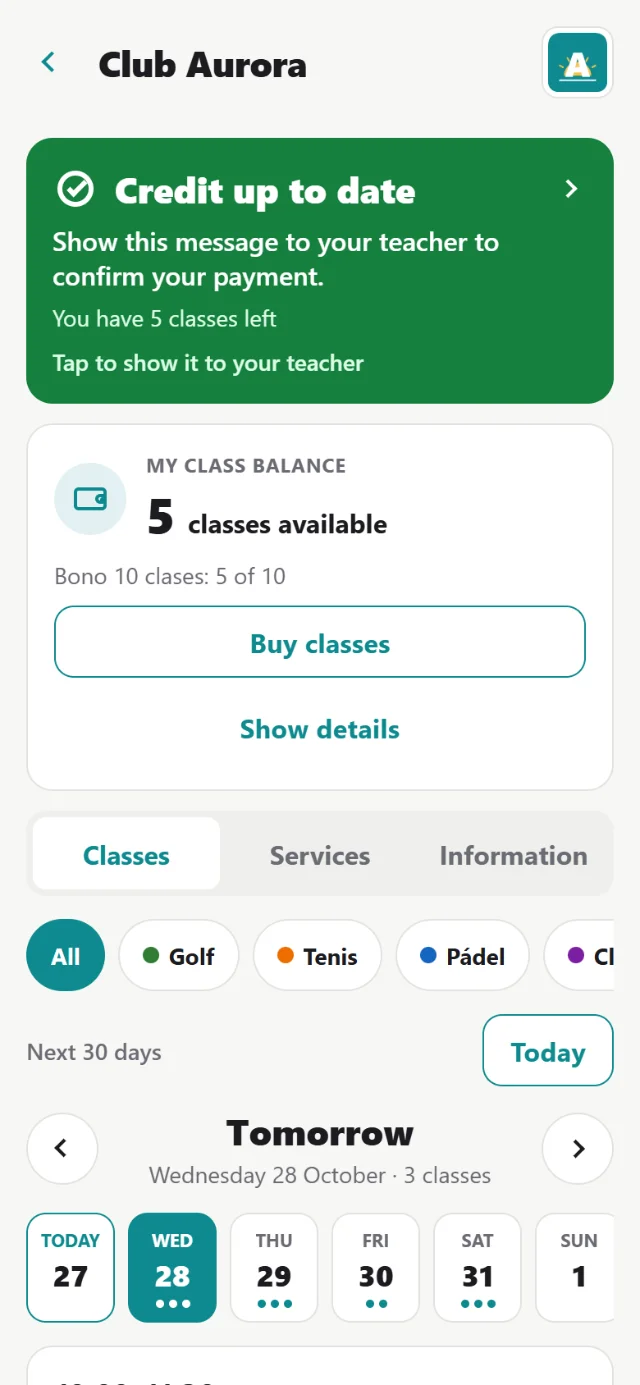
With Tempyra you see your school's classes, book your place and cancel it if you can't make it, with no calls or messages. And you always know how many classes you have left and whether your month is paid.
- Your school invites you
- Android, iPhone and any browser
- In English and Spanish
Features
Everything about your classes, on your phone
What used to be a message to your teacher is now two taps.
-
Book and cancel in seconds
Pick a class, check the free places and book yours.
- Free places for every class, in plain sight
- Waiting list when a class is full: we tell you if a place opens up
- Cancel from the app if you can't make it
-
My classes
Your upcoming classes and the ones you've already taken, all in one place.
- Upcoming classes, with their day and time
- History of past classes
- You can add them to your phone's calendar
-
Your balance, always clear
Know how many classes you have left without having to ask.
- Monthly membership, class packs and single classes
- Classes left this month or in your pack
- Cancel in time and the class goes back to your balance
-
Pay the way you prefer
Depending on what your school offers.
- By card
- With Bizum
- At the school, and your teacher confirms it
-
Notices and reminders
So you never miss a class or a change.
- Notices from your school inside the app
- Reminders by push notification and by email
- You find out if a class is cancelled
-
Your way, with your data safe
The app adapts to you and looks after your information.
- Light mode and dark mode
- In English and Spanish
- Each school's data is kept separate from the rest
The monthly card
Your month at a glance
A coloured card tells you how you're doing this month. Show it to your teacher when you arrive and that's it.
-
Green
All paid up
Your month is paid and you have classes to use.
-
Orange
Balance used up
You've used all your classes for this month.
-
Red
Month not paid
You haven't paid this month yet.
How it works
Get started in four steps
-
Your school invites you
You get a link by email, a QR code or an access code. The invitation always comes from your school.
-
Open the link or install the app
On Android you have the app. On iPhone, or in any browser, you go to app.tempyra.club with nothing to install.
-
Book your classes
See the classes and the free places, and book yours. If it's full, join the waiting list.
-
Show your card and go to class
Your monthly card in green tells your teacher everything is in order.
Frequently asked questions
What students usually ask
How do I get access?
Your school invites you. It sends you a link by email, or gives you a QR code or an access code. If your school uses Tempyra and you don't have an invitation yet, ask your teacher for one.
Do I need to install anything?
On Android you can use the app. On iPhone, or from any browser, you use the web app at app.tempyra.club, with nothing to install. Either way you get the same thing, in English or Spanish and with light or dark mode.
How do I pay for my classes?
It depends on your school: by card or with Bizum from the app, or at the school itself, in which case your teacher confirms the payment. You can have a monthly membership, a class pack or pay for single classes.
Can I cancel a class?
Yes, from “My classes”. Your school sets how many hours in advance you can cancel from the app; if you cancel in time, the class goes back to your balance. If you've missed the deadline, you can send a request to your teacher.
What does the green, orange or red card mean?
It's the status of your month. Green: your month is paid. Orange: you've used up this month's classes. Red: the month hasn't been paid. It's there to show your teacher when you arrive for class.
Is my data safe?
Yes. Each school's data is kept separate from the rest, so your information stays with your school. Your school also approves the devices you sign in from.
Does your school already use Tempyra?
Open the app and sign in with the invitation your school sent you.